


Activating an eSIM on your iPhone lets you use mobile data without inserting a physical SIM card. Please note that our eSIMs are strictly data-only and do not include voice or SMS capabilities.
Check that your iPhone supports eSIM functionality. All models starting from iPhone XS and iPhone XR and newer are compatible. Updating to the latest iOS version is recommended for a smooth setup.
After completing your purchase, you’ll receive an email containing your QR code and setup instructions. Keep this information accessible during installation.
Before activating the eSIM, make sure your iPhone is connected to a reliable Wi-Fi network to ensure the profile downloads correctly.
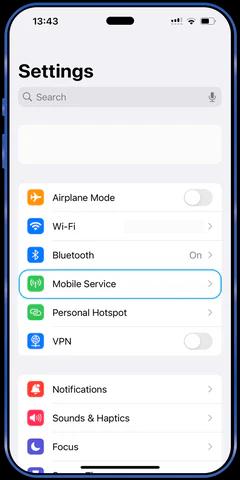
- Open Settings.
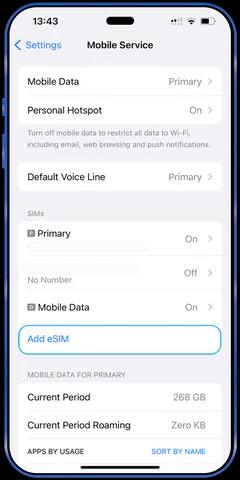
- Tap Cellular or Mobile Data.
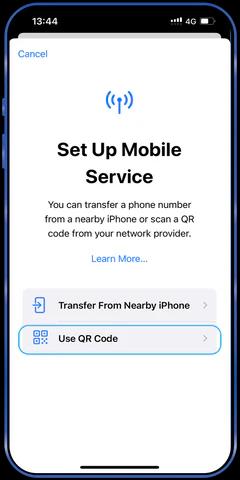
- Select Add Cellular Plan.
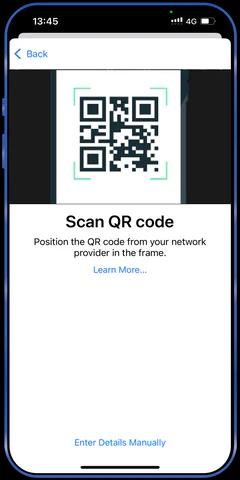
- Scan the QR code you received using your iPhone’s camera.
Since this eSIM is intended exclusively for data usage:
- Assign the eSIM as your mobile data line.
- Confirm that Cellular Data is enabled for the eSIM.
Ensure the eSIM is active by checking for signal strength in the status bar or by navigating to Settings > Cellular.
- If the activation does not complete, restart your iPhone and try again.
- Verify that your device is running the latest iOS version.
- Keep your Wi-Fi connection stable throughout the setup process.
For additional help, reach out to our support team at info@dataroaming.net
Thank you for choosing our eSIM service.