


Setting up an eSIM on your Android device lets you use mobile data without relying on a physical SIM card. Our eSIMs provide data-only connectivity and do not include traditional voice or SMS services.
Check that your Android device supports eSIM technology. Many recent Google Pixel, Samsung Galaxy, and select Huawei models include this feature. For best results, ensure your device is running the latest available software version.
After completing your purchase, an email will be sent to you containing a QR code along with installation instructions. Keep this message available during setup.
Before beginning the installation, make sure your device is connected to a strong and steady Wi-Fi network. A stable connection is required to download and activate the eSIM profile.
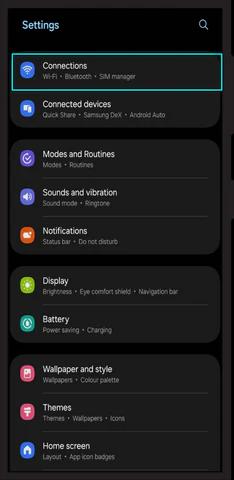
- Open the Settings app on your Android device.
- Tap Network & Internet.
- Select Mobile Network.
- Tap Add Carrier or Add eSIM.
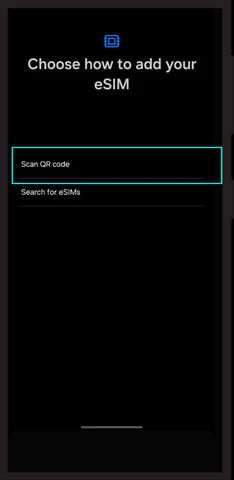
- Scan the QR code you received via email when prompted.
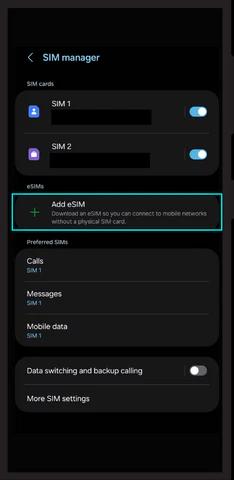
- Use your camera to scan the QR code provided.
- Follow all on-screen instructions to complete the activation process.
Once the eSIM is installed, enable mobile data by following these steps:
- Go to Settings > Network & Internet > Mobile Network.
- Select the newly added eSIM profile.
- Turn on Mobile Data.
Check your signal strength and network status to ensure your eSIM is connected correctly. Once verified, you can begin using mobile data.
- If installation doesn’t complete, restart your device and try again.
- Check for and install any available system updates.
- Make sure your Wi-Fi connection remains active and stable during setup.
If you run into any issues, contact our support team at info@dataroaming.net for guidance.
Thank you for choosing dataroaming.net! Enjoy reliable and hassle-free mobile data with your new eSIM.